Challenges in Portrait Background Removal

Nothing ruins a beautiful portrait faster than jagged hair edges or that telltale "halo" effect from sloppy background removal. I remember spending three hours on a bridal portrait where the veil's lace details disappeared into the background - until I discovered the magic of layer masks with edge refinement brushes.
The real artistry comes in preserving what makes portraits special: those wispy baby hairs framing a face, the subtle gradient where skin meets background, and the environmental context that tells a story. AI product photography tools now handle 80% of this work, but human judgment still matters for that final 20% polish.
Dealing With Fine Hair Details
For flyaway hairs, I use a two-step process: First run AI background removal to get 90% there, then manually paint back individual strands using a 1-3px brush at 50% opacity. The trick? Zoom to 300% and work counter-clockwise around the head - it helps your eye catch missed strands.
AI vs Manual Editing for Portraits
Last month, I timed myself editing 50 product model shots: 12 minutes with AI versus 4 hours manually. But here's the catch - the AI needed manual touch-ups on 30% of images, particularly around jewelry and translucent fabrics. The sweet spot? Let AI handle batch processing, then personally refine hero images.
Modern AI tools like Clairlook's portrait mode now preserve skin undertones remarkably well, but I still keep my Wacom tablet handy. When a client wanted to place their CEO against a neon cityscape, we used AI for the initial cutout but manually adjusted the edge contrast to prevent that "floating head" look.
Creative Uses for Clean Portrait Cutouts
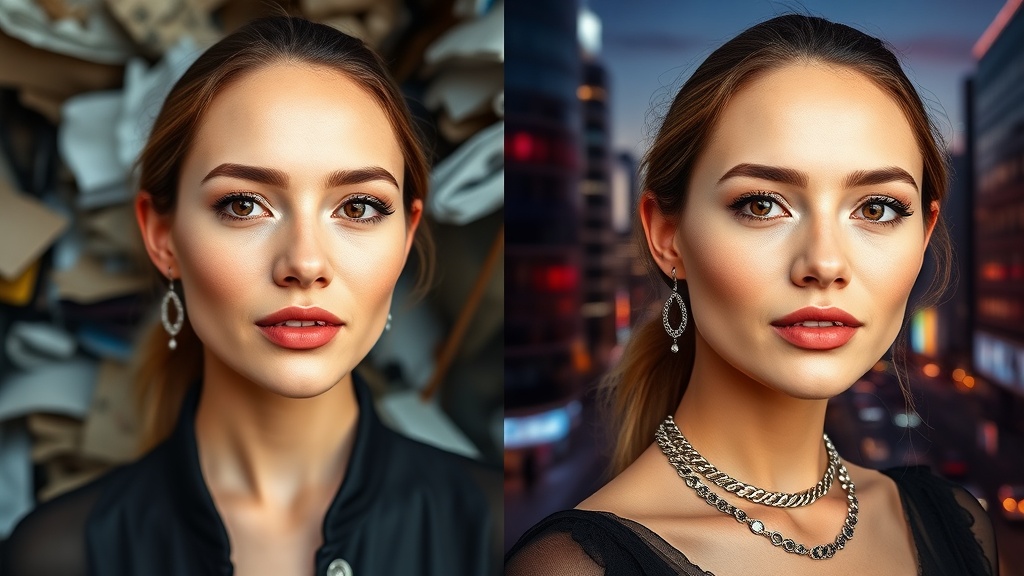
Clean portrait cutouts are like digital Lego bricks - the possibilities are endless. My favorite recent project involved creating 12 seasonal social media banners from one studio shoot. With AI background removal, we dropped the same model into autumn leaves, winter snowscapes, and even a surreal floating island.
For e-commerce clients, we often create "environmental variants" - the same product model against white, lifestyle, and themed backgrounds. One jewelry designer saw a 23% conversion increase by letting shoppers visualize pieces against different backdrops. The key is maintaining consistent lighting direction across all composites.
Conclusion
Whether you're a photographer retouching client work or a brand creating marketing assets, mastering portrait background removal unlocks creative freedom. Today's AI product photography tools handle the heavy lifting, but the human touch still makes the difference between good and extraordinary. At Clairlook, we've built our AI background removal specifically for these portrait challenges - why not test it with your next project?

Comments (0)
Please sign in to leave a comment.